[This page displays best at a screen resolution of 1024 by 768 pixels. Un-maximize your browser if you are at a higher screen resolution.]
New features for the AstrolDeluxe astrology program, version 8
by Halloran Software
Now seeking Beta-testers for features of the new version 8 of AstrolDeluxe ReportWriter - available for $50 to version 7.1 customers, with an unlimited number of $25 credits if you are the first to suggest a fix or change that I adopt. The current 7.1 program version has been stable at 7.1.14 since September 2009, so new features added since then have not been tested by working users. We will send you the updated files by e-mail (using the service YouSendIt). When you have saved the zip file, extract it to your c:\winastro application folder, where you already have version 7.1 installed.
Every astrologer should find the new Transits Calendar feature to be immediately useful and helpful. Many users of my old LifeTrends program liked this graphic calendar and have wished to see it ported to the Windows program. The biggest challenge was figuring out how to show multiple months of output in the Windows graphic interface, but I have managed to do so by adding a Spin Button control to let you page forward and backward between two months of transits calendar at a time. See below.
AstrolDeluxe ReportWriter is now the first mainstream program to correctly calculate Classical Primary Directions as well as the related but new Rational Primary Directions. See below.
AstrolDeluxe ReportWriter can now use astrological font glyphs for its graphic wheels. These glyphs tend to have a sharper, more well-defined appearance than the program's native graphically drawn glyphs. The Font Mapper program that has always come with AstrolDeluxe now supports two sets of mappings, one for the program's text tables and another for the graphic wheels. The default mapping is to the optional $49 Halloran font, which many of you already have, but Font Mapper makes it easy to use any astrological font that you own, such as a glyph font from another software company. See below.
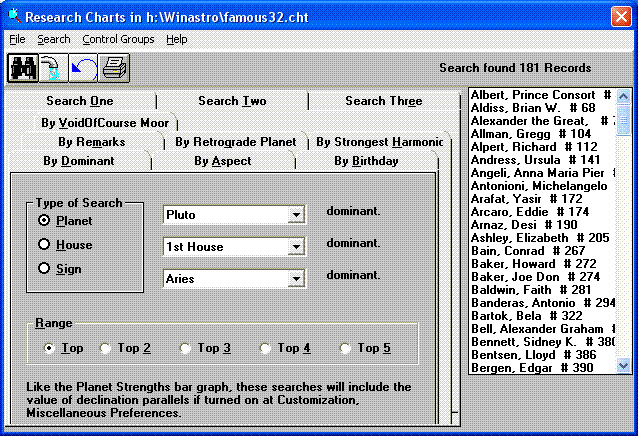
Version 7.1.15 adds to Options, Research Charts, Search Two a new tab with the By Dominant search. This allows the user to find charts that have a particular planet, house, or sign dominant in the chart. The default setting is to find charts in which the selected planet, house, or sign is among the top three most dominant for the chart, but the form gives five radio buttons so the user can set the allowed range from the top five most dominant in the chart to the top most dominant planet, house, or sign. This search uses the same program logic as the interpretation report order commands DoDominantPlanets, DoDominantHouses, and DoDominantSigns. The Career template and the KidZone templates use these commands. The searches look at the aspects of the planets, comparing the actual orbs to the orbs defined at Customization, Aspect Orbs. The calculation of planet dominance for the interpretation reports adds strength to a planet if it is near one of the four chart angles, within the orb set for an Orb of Lights conjunction. When I was programming this search, I found that the Planet Strengths bar graph on the Display menu of the Chart Information screen was not intensifying the strength for these angular planets, so I added that, for single wheels only.
Version 7.1.15 also fixes a blank page problem with the Classic British Astro Reports that was happening because the Uranus and Neptune subheading text was so long and the subheadings were set with the KEEP_WITH_NEXT property. The Classic template was modified to turn off this subheading property, but the program now turns off this property if the length of the text is greater than 2000 characters.
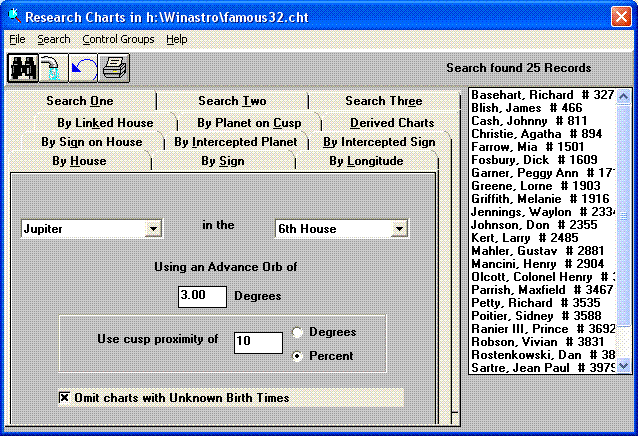
Version 7.1.15 now allows the user to specify degree of proximity to the house cusp when searching for charts with a particular planet in a particular house. The required closeness to the house cusp can be expressed either in degrees or as a percent of the house width. Can be used simultaneously with the house advance orb in degrees. Made some fixes involving circumpolar charts. I added this refinement to the By House search because I found that house placement interpretations applied the strongest to people's lives when the planet was near the house cusp. When the planet was in the late middle of the house, the interpretation did not seem to apply.
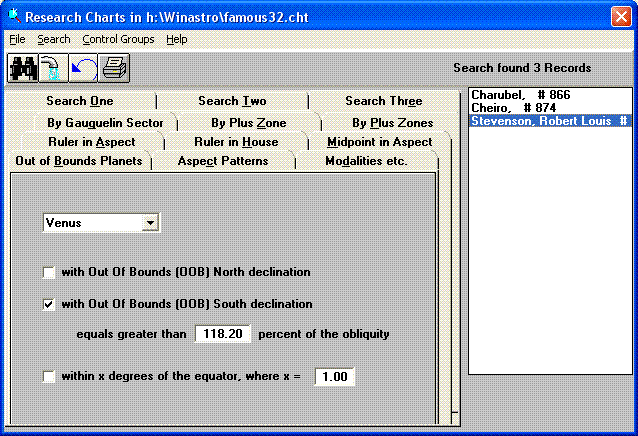
Version 7.1.15 adds more choices to Search Tab 3, Out of Bounds search. Provided three check boxes. Can search for charts that have a particular OOB planet that has North declination, South declination or both, or one can search for a planet that is on the equator. Can refine an Out of Bounds search by specifying that the declination must be greater than a given percentage of the obliquity, where 100 percent is the default but changeable value. Could change to 115 percent or 50 percent. The user can also specify the nearness of the planet to the equator, changing the default value of 1 degree, e.g., to 0.08 degrees or 4.50 degrees. If you search the Famous Charts to find charts with a planet less than 0.08 degrees from the equator you will find that the planet is emphasized - what are the odds that of the 6 out of 4920 historical figures who have Mars exactly on the equator that two of them would be famous sex researchers - Havelock Ellis and Sigmund Freud? Or that of the 3 out of 4920 historical figures who have Venus at extreme OOB South declination, greater than 118 percent of the obliquity, they would all be extremely sensitive: Charubel, Cheiro, and Robert Louis Stevenson?
A planet on the equator will be in either Pisces/Aries or Virgo/Libra. A planet with extreme North declination will be in Gemini/Cancer and a planet with extreme South declination will be in Sagittarius or Capricorn. The character of the charts with these noteworthy declinations will cluster even more tightly if you make these zodiac sign placements part of your searches. To visually see what is happening with these noteworthy declination planets, double click on one of the found charts and then from the Display menu select Boehrer Graphic Declination Chart.
You might want to find charts that have a planet at a particular intermediate declination, such as 10 degrees South. If you experiment with running these searches consecutively, you can narrow the remaining charts down to a particular declination, such as consecutive searches for 43 percent of South obliquity and within 10.5 degrees of the equator leaving just 16 charts with Venus between 10.0 and 10.5 South declination. Perhaps one can map a topology of planet declinations - I note that 7 of the 16 charts are involved with music, while 4 are politicians. The combination of the search tool with the historical data opens up a new field for astrological research.
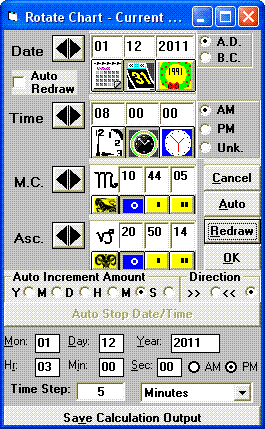
Version 7.1.16 adds more capability to Rotate/Rectify Chart on the Edit menu of the Chart Information screen. Whereas before, each calculation was done for one time unit at a time, now the step unit can be a specified number of time units. The user can now enter a stop date and time for the calculation. These options are available through an Additional Settings bar command at the bottom of the Rotate/Rectify Chart form. Clicking on that shows fields for the stop date/time and a box to enter the number of step units, where the step unit is selected from a listbox, including year, month, day, hour, minute, and second.
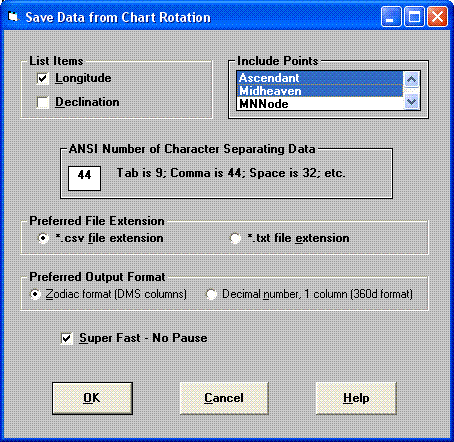
The new feature lets you save to either a *.csv file or a *.txt file longitude and/or declination data for selected planets/points for each calculation step. There is a Save Calculation Output bar command which shows a screen with checkboxes for Longitude and Declination, a listbox of planets and points that may be selected, the column separator specified, the preferred file extension selected, either *.csv or *.txt, the preferred output format selected, either Zodiac sign format in Degree-Minute-Seconds in separate columns or 360-degree format in decimal numbers in single columns, and a checkbox for Super Speed - No Pause when calculating and saving to file. Clicking on OK allows specification of the output file and return to the Rotate/Rectify Chart form where one must click on the Auto button to start the calculations. If you have Microsoft Office installed, if you double-click on the resulting file ending with the *.csv extension, it will automatically open in Microsoft Excel. The first column will always be a Date column. There will also be a time column (where the heading is the time zone abbreviation, such as PST) if the step unit is in hours, minutes, or seconds, or if the step unit is days, months, or years and the Starting time in the Rotate/Rectify Chart form is different from the Stop Time.
Version 7.1.17 adds some code to the Open Charts File procedure to test for the presence of the companion *.mdb file that gets created when More Chart Data is turned on. If this file is present, then the code will toggle the More Chart Data switch at the bottom of the Customization menu and the More Chart Data bar command button underneath Remarks will become visible. The need for this code came to my attention when a customer wondered about all the remarks that he had entered a long time ago for his chart subjects and I asked him if he had toggled on More Chart Data. He replied that suddenly he saw data that he had not seen in ten years. So his charts files had migrated from an old computer to a new computer, but More Chart Data had never been turned on for the new computer. When adding the code to check for the existence of a charts file companion *.mdb file, I had to add code that will create a moredata.chk file in the application folder when the user really does click to toggle on More Chart Data on the Customization menu. If this file is missing and the user opens a charts file that has no companion *.mdb file, then the program turns off More Chart Data.
Version 7.1.17 fixes a problem displaying the activated sections for a stellium aspect pattern at Display, Chart Analysis when List Activated Sections is chosen at Customization, Aspect Patterns. Eliminated duplication of sections and the possibility of an incorrect second section.
Version 7.1.17 switches to a newer version of the registration/protection software used by the web-enabled program, eliminating calls to the 16-bit MACHNM1.EXE to get the BIOS ID. This allows the web-enabled AstrolDeluxe to work on 64-bit systems.
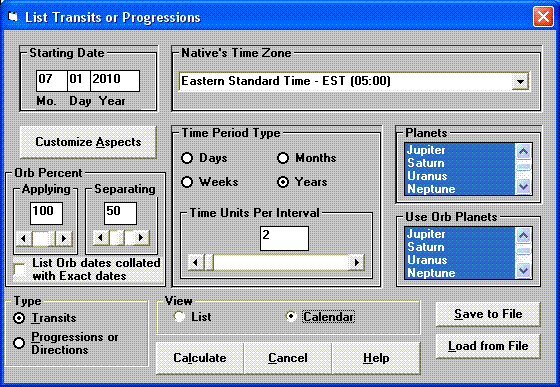
Version 7.1.18 adds a Transits Calendar to Options, List Transits and Progressions. There is a new View frame on this form, above Calculate, which gives option radio buttons for List or Calendar. If you choose Calendar and then click Calculate, you will get a display for up to two months at a time with a row for each transiting aspect showing visually when the transiting aspect is exact and, for the outer planets starting with Jupiter, when the aspect enters orb and when it leaves orb. The asterisk (*) indicates the date on which the aspect becomes exact. The greater than (>) and less than (<) signs indicate that an outer planet aspect is within orb and is respectively applying or separating. The R indicates the date on which a planet reverses apparent direction, causing an applying aspect to separate without becoming exact.
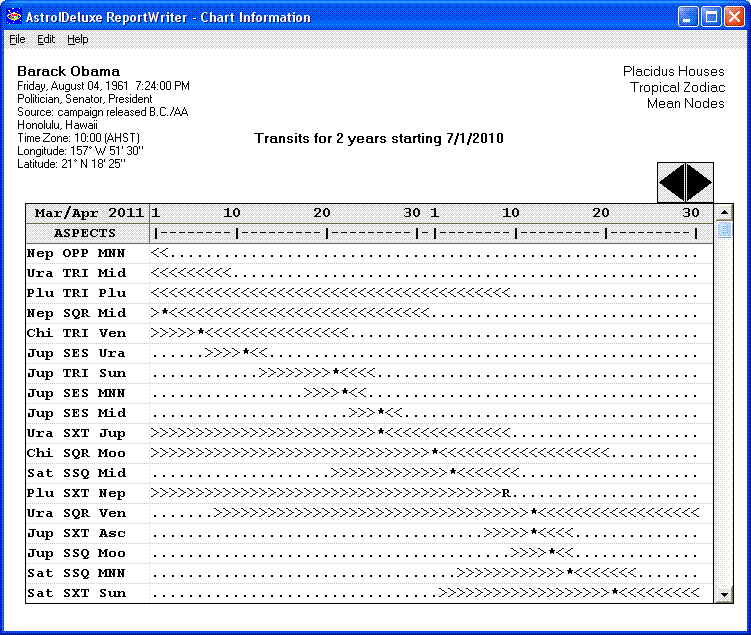
If the calculation is for longer than the two months shown, you can click on the forward arrow of the spin control at the top right of the calendar. The program will show aspects for up to another two months. There is no limit to for how many months the program will do this, and you can click on both the backward and forward spin button arrows to see the calendar display of aspects for all the months for which you calculated.
From the File menu you can print to the printer the one or two month display of transiting aspects shown, or from the Edit menu you can copy the display to the Windows clipboard. The transiting aspects must be shown in the monospaced font Courier New (point size 11) in order for the symbols representing each day to line up in even columns (a proportional font would not work). For this reason, the transits calendar does not use the optional Halloran font which substitutes the astrological glyphs for the planet and aspect abbreviations - if you have this font turned on, the transits calendar will not use it. AstrolDeluxe will automatically try to print the transits calendar to the paper in Landscape mode (as opposed to Portrait mode).
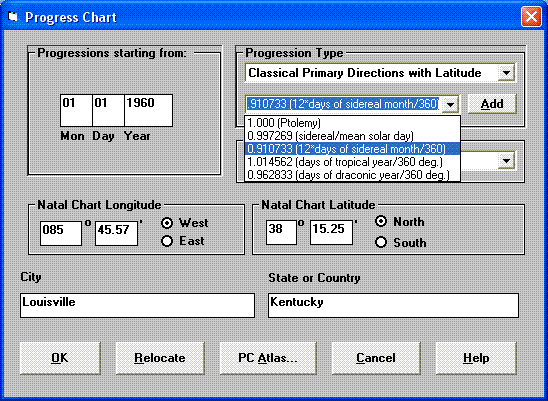
Version 7.1.19 adds Primary Directions to the timed Progressions lists that AstrolDeluxe ReportWriter will calculate from the first choice on the Options menu. The procedure is that you select a saved chart record from the Saved Charts listbox and then click on the Options menu and select List Transits & Progressions. At the lower left of that form you switch from Transits to Progressions/Directions. Set the start year in the Starting Date box and set the number of years for the list at the center of the form. Click Calculate.
You get a form that lets you choose the type of progressions/directions. In the listbox at the upper right, switch from Secondary Progressions to one of the three choices for Primary Directions, listed in order of preference: Rational Primary Directions, Classical Primary Directions with Latitude, or Classical Primary Directions without Latitude. Click Okay. The program will calculate and display a list of all the aspects and dates found for the life period that you specified.
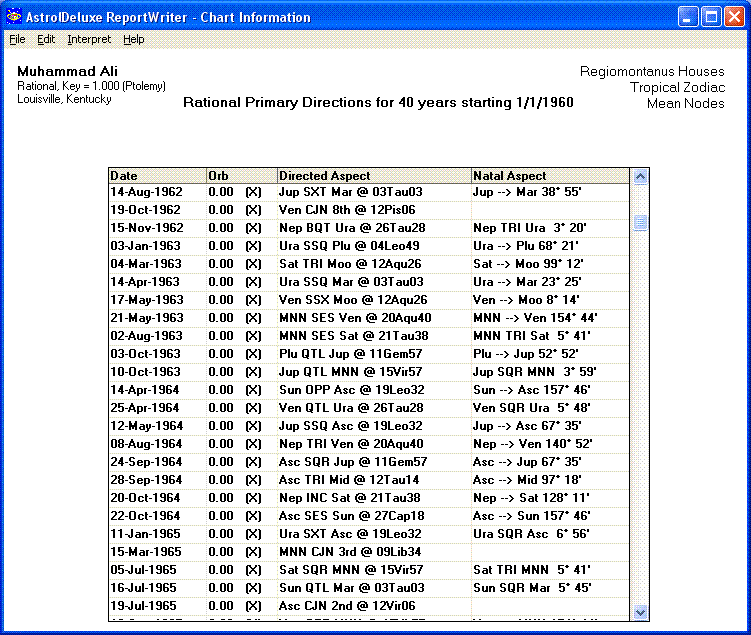
If you have earlier gone to Customization, Planets and turned on the Moon's Nodes, then the Moon's North Node will automatically be selected in the Use Planets listbox, but you can select any of the bodies shown in the Use Planets listbox as directed points, what Medieval astrologers called Significators. They tended to focus on the Sun, Moon, Ascendant, and Midheaven. The target bodies in the chart (called Promittors) will be those selected at Customization, Planets in the Include column. For this program version, I added a checkbox, Disallow Invisible Outer Planets, to Customization, Planets which, if you check it, will exclude the trans-Saturnian planets Uranus, Neptune, and Pluto, discovered after the time of classical astrology.
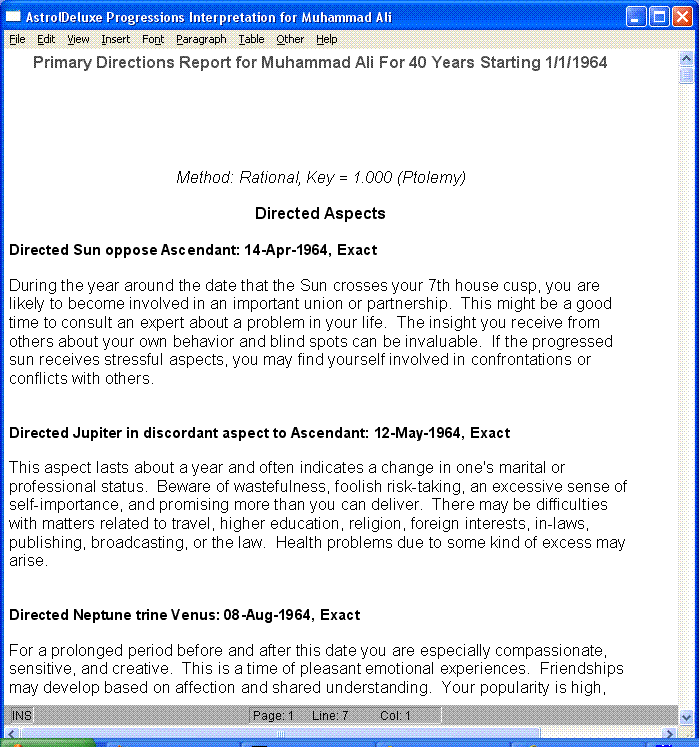
If you have purchased the $100 add-on of the Journey Progressions interpretations (by author Tony Louis), then when a list of Directions for no more than 40 years is displayed, you can click on Interpret, Report Options and in the Templates listbox at the upper middle of that form, switch from Standard to Directions. Then close that form and do Interpret, Create Report. With normal settings, a directions list can be for as many as 100 years. But if you will be doing a directions interpretation report, the program may say that it has run out of string memory while generating the report if you have calculated a list for more than 40 years. While not specifically written for a Primary Directions report, Tony's interpretations still provide good guidance on what to expect from particular directions.
I acknowledge invaluable assistance from scientist Dr. Roberto Fantechi, who has an elegant understanding of the geometry and mathematics of spherical motions. Dr. Fantechi writes, "Various softwares claim to be able to calculate Primary Directions, exhibiting a variety of methods establishing relations between the sky as seen at birth and the sky as seen after some time has elapsed since birth. Quite often these methods take no account either of the geographical latitude of the birthplace, or of the ecliptic latitude of the planets. In other words they consider all the planets to be exactly on the Ecliptic, and all places on earth to be on the terrestrial equator. This tells a lot about their real value, and to call them "Primary Directions" induces people to believe that they are the true Primary Directions as practised by great Astrologers of the past, such as Regiomontanus, Argolus, Morinus and Lilly.
"But these Authors did not call "primary" their Directions, that were just "Directions", the term "primary" having came into use only when the Secondary system of 1 day/year was introduced. Therefore, although the term may be misleading, nobody can be denied the right to call "primary" any method that is not "secondary".
"In order to avoid any confusion, our suggestion is that the term "primary" should be used to indicate any prognostication system ignoring the real movements of the planets in the sky. This definition would include various modern "primary" direction methods and the so-called "symbolic" directions. To mark their difference from them, the directions used by the ancient Astrologers should be called "Classical (Primary) Directions"."
Classical Directions involve determining the Oblique Ascension for each planet and house cusp in the natal chart, getting the distance between those Oblique Ascensions, and then by use of a key rate finding the number of years that it would take to direct the Significators to each Promittor and to the Promittor's aspects. The simplest key rate is one year per degree of Oblique Ascension, which we have from Claudius Ptolemy. There are other natural ratios that come very close to one degree per year. You can select or enter one of these different rates before you click the Okay button. Some ancient astrologers neglected ecliptic latitude for the planets in their aspect calculations, a simplification that is unnecessary in the computer age. But the program gives you a choice of calculating Classical Directions with or without Latitude for the aspects.
Dr. Fantechi writes, "That Aspects may have Latitude is a concept unknown to the vast majority of astrologers, but a matter of common knowledge in the Middle Ages. To explain: suppose the Moon to be at 15° Taurus with a Latitude of 5°. Her true Opposition is not just 15° Scorpio, but the point diametrically opposed to her on the sphere, that is a point with Longitude = 15° Scorpio and Latitude = -5°. This means in general that all the Aspects of any given Planet are distributed along a circle (Bianchini's Latitude Circle) having the same centre as the Ecliptic, but inclined with respect to the latter by an angle equal to the Latitude of the Planet."
But it is not Classical Directions, however rigorously calculated, that convinced me to add directions to AstrolDeluxe ReportWriter. Rather, after studying Classical Directions together with the Modus Rationalis house division method of great astronomer mathematicians such as Regiomontanus, Dr. Fantechi came up with an even better method for directing the planets which, when tested, gives accurate dates for sudden, unexpected events in people's lives even into middle age and old age. This "Rational" method of Primary Directions first converts all points to Oblique Longitude. "Oblique Longitude" is a term invented by Dr. Fantechi to define the intersection of a Position Circle with the Ecliptic (while the Normal Longitude is the intersection of the latter with a Latitude Circle). According to this definition, all the House Cusps in systems such as Regiomontanus or Campanus (and, with some possible adjustment, even Placidus) are Oblique Longitudes. With points having zero ecliptic Latitude, Normal Longitude and Oblique Longitude coincide.
The program casts all positions in a chart as Oblique Longitudes, which means that the planetary positions are determined by Position Circles. This has three advantages:
(1) The chart is made totally self-consistent (if the House System is Regiomontanus, or Campanus, or even Placidus);
(2) Since in order to calculate Oblique Longitudes one needs both the Geographical Latitude of the birth place and the Ecliptic Latitude of all the celestial bodies, a chart calculated and cast in this way is both astronomically correct and specific of the birth place;
(3) No Planet with Latitude would ever risk to be seen in a House different from the one it really is in.
Once a chart is cast in this way, it is an immediate step forward to calculate Primary Directions by measuring distances of Oblique Longitudes along the Ecliptic. This would resemble the "Symbolic Directions" system except that:
(1) Since the Planets' Latitudes are included in the calculation, the real Planets' bodies are taken account of, not just the Ecliptic points measuring their Longitudes;
(2) Since the geographical Latitude of the birthplace is not neglected, the Planets' positions with respect to the local Horizon are taken account of, which does not happen in the "Symbolic" system;
(3) The calculation of the Oblique Longitudes involves the same quantities as are needed by the Classical Directions and by the Rational (Modus Rationalis, i.e. Regiomontanus) House System. The three are therefore closely related.
We have found that this system of Rational Directions produces the best correspondences with important events in our own lives, but I thought it advisable to test it with events from well-known lives. I eliminated from consideration famous persons whose birth was stated as being on the hour, such as JFK, as accurate timing of events requires an accurate birth time. The celebrities for whom I found the necessary life event information were Indira Gandhi, Princess Diana, and Muhammad Ali.
Indira Gandhi, 11/19/1917 11:11 PM, Allahabad, India
1942.03.26 Married journalist Feroze Gandhi | VEN OPP NEP 3/6/42
1942.09.11 Imprisoned for subversion by British govt. | SAT CJN MAR 6/21/42
1943.05.13 Released from prison | VEN TRI JUP 1/25/43, MNN CJN MOO 6/20/43
1944.08.20 Son Rajiv born, conception 9 mos. earlier | MAR SSQ ASC 12/16/43
1959 Elected president of the Indian National Congress | PLU SQU MC 1/14/59
1964.05.27 Father, Jawaharlal Nehru, dies | ASC SQU PLU 5/21/64
1966.01.19 Became Prime Minister of India | ASC TRI JUP 10/22/65, URA SEX JUP 1/11/66, JUP TRI SUN 9/17/66, MC CJN PLU 9/24/66
1969.11.12 Censured for bank nationalization & income ceilings | SAT SQU PLU 1/16/70
1975.06.26 Declared a State of Emergency in India | SAT SSQ SUN 4/18/75, MAR TRI PLU 6/17/75, ASC INC MC 7/16/75
1977.03.22 Voted out of office | NEP SQU PLU 5/8/77
1980.01.07 Returned to office by landslide election | MC INC URA 1/4/80
1984.10.31 Murdered by political opponents | URA INC SUN 11/8/84
Princess Diana, 7/1/1961 7:45 PM, Sandringham, England
1980 July First date with Prince Charles | MAR TRI VEN 5/12/80, JUP TRI MER 11/24/80
1981.02.03 Prince Charles proposes marriage | NEP SEX SAT 3/21/81
1981.07.29 Fairy-tale wedding at St. Paul's Cathedral | ASC SEX NEP 6/20/81, MAR CJN PLU 5/18/81
1982.06.21 Prince William born, conception 9 mos. earlier | SAT SEX ASC 10/23/81
1985 Marital trouble rumors appear in "The Sun" and "Star" | SAT SQU VEN 11/23/85
1992.06.16 Publ. Morton's book Diana: Her True Story | SUN SSQ MER 6/16/92,
PLU TRI MOO 6/25/92, VEN SQU PLU 7/6/92, MOO SQU MER 8/17/92
1992.12.09 Formal announcement of legal separation | MC SQU MOO 12/8/92
1996.02.29 Diana announced she'd agreed to a divorce | PLU SQU SAT 2/2/96, ASC SQU MC 2/22/96
1996.08.28 Divorce and settlement | MC SEX SAT 7/17/96, ASC TRI PLU 8/6/96
1997.06.26 Christie's in NY auctioned 79 of her evening gowns | MC CJN 12TH 7/1/97
1997.07.17 Charles hosts Camilla's 50th birthday party | MAR SQU SUN 7/14/97
1997.08.11 Kissing photos confirm affair with Dodi Fayed | MAR SQU SUN 7/14/97
1997.08.31 Dies from car crash injuries.
When the list indicates that Diana's directed MC entered her natal 12th house two
months before her death, the natal house cusps have been calculated as oblique
longitudes according to the Modus Rationalis used by Regiomontanus.
Muhammad Ali, born Cassius Clay 1/17/1942 6:35 PM, Louisville, Kentucky
1964.03.06 Changes name and joins Nation of Islam | SUN OPP ASC 4/14/64
1964.08.14 Marries Sonji Roy one month after meeting | NEP TRI VEN 8/8/64
1967.04.28 Refuses induction into U.S. Army | SUN SQU SAT 3/27/67
1967.08.17 Marries 17-year old Belinda Boyd | VEN SSQ MAR 7/21/1967
1971.03.08 Fights and loses to champion Joe Frazier | SUN SQU URA 4/21/71
1971.06.28 Supreme Court reverses his conviction | MER SSQ SUN 6/6/71
1973.03.31 Ken Norton breaks Ali's jaw | URA SES MER 5/29/73
1974.10.30 George Foreman strikes Ali with hundreds of blows during fight in Africa, as Ali uses 'rope-a-dope' to wear out Foreman | NEP SQU PLU 10/31/74
1977.06.19 Marries Veronica Porsche, mother of Laila | VEN SEX SUN 1/22/77, SUN SEX MAR 7/16/77
1978.02.15 Loses heavyweight title to Leon Spinks | SAT SES MOO 3/4/78
1979.06.27 Announces retirement | VEN OPP NEP 6/29/79, SAT SQU NEP 4/16/79
1984.09.22 NY Times reports he has Parkinson's | NEP OPP MC 7/20/84
1996.07.19 Lights the flame at Summer Olympics opening | MAR INC SUN 7/21/96 - born with SUN SQU MAR
These three famous test subjects show good correspondence between the Rational Primary Directions and important, unplanned events in their lives.
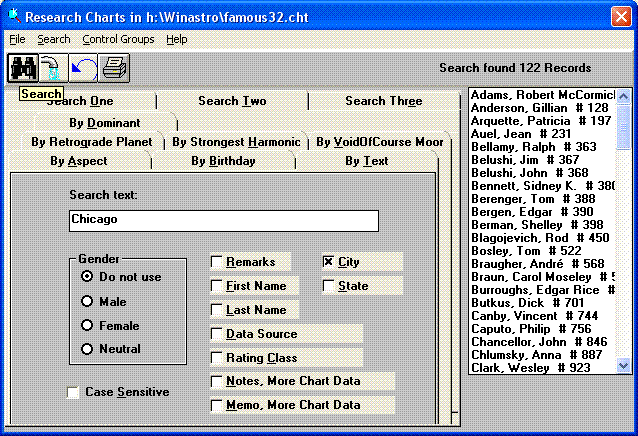
Version 7.1.20 makes two fixes to the Primary Directions list. The list was skipping aspects from a planet to itself - fixed to only skip the conjunction aspect. The list was also incorrectly looking at the listbox of directed planets to know to which planets in the chart aspects should be formed. I wanted to see all the aspects formed by directed Venus to the other planets, but I was only getting aspects from Venus to Venus because I had unselected all the other planets in the Planets listbox. Fixed to look at the planets selected at Customization, Planets. So the Significators are the planets selected in the Planets listbox at List Transits & Progressions and the Promittors are the planets selected at Customization, Planets.
Version 7.1.20 changes the By Remarks search on the Search Two tab to say By Text. It adds searches for text in the City field and the Country/State field.
Version 7.1.20 added to the Modalities etc. search on the Search Three tab the ability to search for charts by hemisphere and quadrant emphasis. One can specify the percentage of planets that must be in the Upper Hemisphere, Lower Hemisphere, Eastern Hemisphere, Western Hemisphere, First Quadrant, Second Quadrant, Third Quadrant, and Fourth Quadrant.
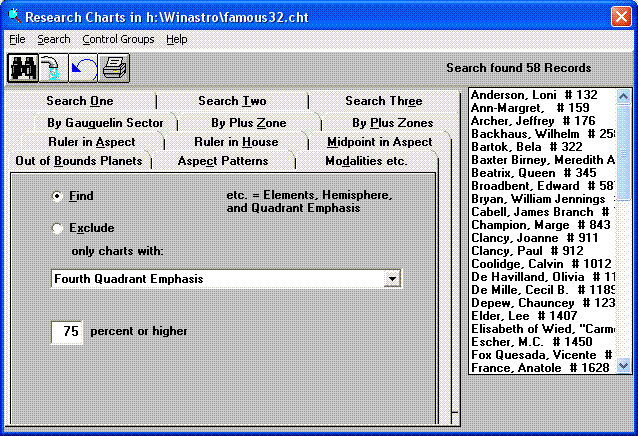 For a setting of 100 percent, the 4939 Famous Charts produce:
Upper Hemisphere: 26 charts
Lower Hemisphere: 14 charts
Eastern Hemisphere: 25 charts
Western Hemisphere: 13 charts
For a setting of 75 percent, the 4939 Famous Charts produce:
First Quadrant: 39 charts
Second Quadrant: 38 charts
Third Quadrant: 43 charts
Fourth Quadrant: 58 charts
This finding is consistent with houses 10, 11, and 12 being more focused on public life as opposed to private life.
Version 7.1.20 enables converse or prenatal primary directions - just put a minus sign (-) in front of the key rate, such as "-1.000" instead of "1.000". We know of no justification for this, as the celestial sphere carrying the promittors and their aspects to meet the significators moves from east to west, not west to east, but the ability is now in the program.
Version 7.1.20 fixes some problems with the logic for eliminating duplicate direction aspects, which in some cases was eliminating first-time occurrences of a direction.
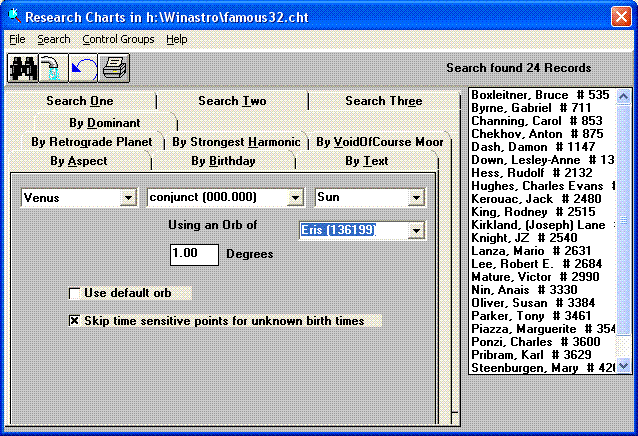
Version 7.1.21 adds to the Search Two tab, Aspect search, the ability to find charts with Planet to Asteroid aspects. It adds below the 2nd planets listbox a listbox with all the asteroids that are selected at Customization, Asteroids. The decision on whether to search for the planet shown in the 2nd planets listbox or for the asteroid shown in the asteroids listbox is based on whichever listbox last had the focus. I added this capability specifically so that I and others can do more research into the distant body Eris, whose elements are among the asteroid elements that can be downloaded from my web site Updates page. If the date for the chart is outside the 1800-2100 AD time range, the chart will not qualify for the asteroid results list. If you want the search to use the narrow asteroid aspects orbs instead of the wider planets aspects orbs, set at Customization, Aspect Orbs, you can make the orb width narrower.
Version 7.1.22 adds recognition of the KidZone Combo interpretation file and its templates. The KidZone Combo set is version 3 of Marise Payne's child natal interpretations, which Marise expanded by writing 1008 delineations for the possible sign and house combinations of each planet, Sun through Saturn. It adds almost five megabytes worth of text to the previous KidZone with Sun/Moon interpretation set.
Version 7.1.23 adds the ability for transit interpretations to include inserts that refine aspect interpretations based on the natal house placement of the aspected planet. For example, in the body of the aspect delineation for Neptune oppose Uranus you would stick a set of 12 tags such as ‹‹Neptune opposite Uranus, Uranus is in the 1st House››. You would then use the Add New screen to create a set of combo delineations, each of which has a short paragraph of text that you want the program to insert, based on which of those tags is true - in the example case, in order for the program to grab and insert that text the report subject must have natal Uranus in the 1st House. Tags that are not true will just automatically disappear from the report text.
Version 7.1.23 starts checking the size of the Chart Information screen to see if the form size is greater than 1024 x 768. If it is, then the numbers that print within the wheel will start proportionally increasing their font size, in order to keep up with the size of the graphically drawn wheel and glyphs of the planets and signs. Also found that in these cases File, Save Screen as Image File was cutting off the very bottom of the wheel. Had to increase the percentage of the screen height that the program captures.
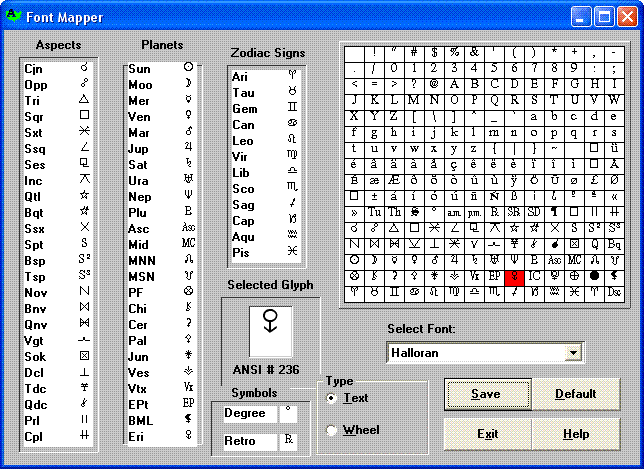
Version 7.1.23 introduces a new version 3.1 of the Font Mapper program (at Customization, Map Astrological Fonts). It adds a new Type frame in which are radio buttons for Text or Wheel. This allows the user to have two different font mappings - one for the text lists and tables in AstrolDeluxe ReportWriter, version 8, and another for the graphic wheels. The optional Halloran font will again be the default for both font mappings, but if you own a different astrological font whose glyphs you prefer for your graphic wheels, Font Mapper allows you to select and map the glyphs of that font.
Once you have saved your wheel font mapping, you can tell AstrolDeluxe to use that font for its graphic wheels by clicking at Customization, Use Astrological Font and toggling Wheel On so that the checkmark appears. Your mapped font will be used for planet glyphs, sign glyphs, and aspect glyphs. When Wheel On is toggled off, AstrolDeluxe will draw the glyphs graphically, instead of using a font, as it always has.
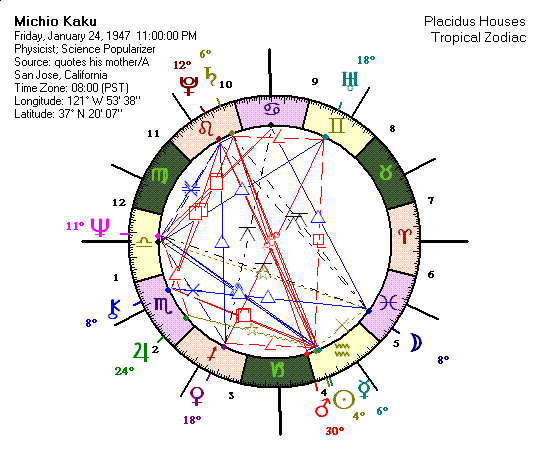
Version 7.1.23 allows the graphic aspects wheel to display planet degree and/or minute numbers adjacent to the planet glyphs on the outside of the wheel. At Customization, Initial Chart Display added a section - Customize Graphic Aspects Wheel - with three choices:
1) No Degree Numbers
2) Rounded Degree Numbers
3) Degrees and Minutes (DD:MM)
The 2nd choice, displaying the planets' rounded degrees, will be the default display on the graphic aspects wheel from now on, unless the user goes to Customization, Initial Chart Display, to change it.
Version 7.1.23 restores the ability to get a transits interpretation report if you have run a transits list for a saved composite chart.
Version 7.1.23 adds for natal and composite interpretation reports a new available command, near the bottom of all the Report Items commands - HemiQuadEmphasis. It works together with a new set of interpretation titles which have been added to the Edit Interpretations program. On the Add New screen. I changed the title of the Element/Modality Frequency listbox to just Frequency, and added at the bottom of this listbox the following supported delineation titles:
"Chart Hemisphere Emphasis Upper"
"Chart Hemisphere Emphasis Lower"
"Chart Hemisphere Emphasis East"
"Chart Hemisphere Emphasis West"
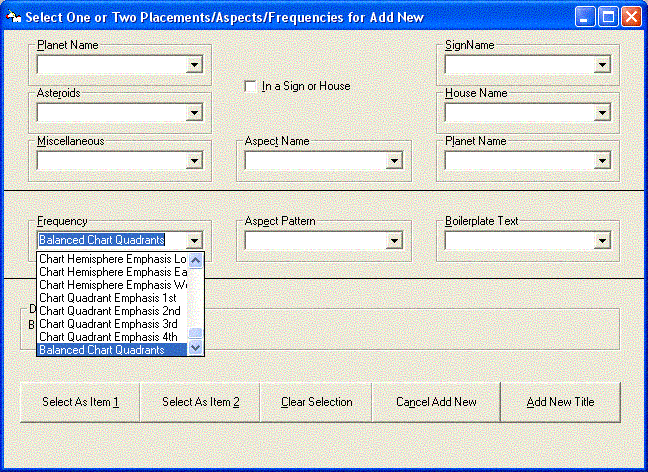 "Chart Quadrant Emphasis 1st"
"Chart Quadrant Emphasis 2nd"
"Chart Quadrant Emphasis 3rd"
"Chart Quadrant Emphasis 4th"
"Balanced Chart Quadrants"
If you add the HemiQuadEmphasis report command to a natal or composite template, then the reportwriter will loop through each of the chart's four hemispheres and quadrants, checking to see if 80% or more of the planets are in a particular hemisphere, or if 40% or more of the planets are in a particular quadrant. If they are, then the program will try to grab the matching delineation from the current interpretation database. If none of the above conditions are met, then it will try to grab and print the Balanced Chart Quadrants delineation. The planets have the point values which are assigned at Customization, Planets, Set Points for Elements and Modalities. In your template's Report Order sequence, you should precede the HemiQuadEmphasis command with a SectionTitle command consisting of something like Chart Balance and then before the section title command you should have the SkipNextIfUnkTime command, so that the entire section will not even appear in a report for an unknown birthtime chart. When you are writing the delineations in the Edit Interpretations program, you can use <subject> to have the reportwriter insert the report subject's first name and you can use he^^she or him^^her to have it insert the correct gender pronouns into the text.
Go to the special Secure Order Form for this $50 offer.
Copyright © 2010 Halloran Software, Los Angeles, California
Last modified on August 31, 2010.
http://www.halloran.com/beta8.htm/