First
time Biorhythms Pro program will start in a Demo mode. This
is almost a fully functional copy of the program except it
will not accept display biorhythms for dates after January
2010. It enables you to evaluate the advantages of the
program, including click the Interpret button to see interpretations
for different days depending on the cycles.
In
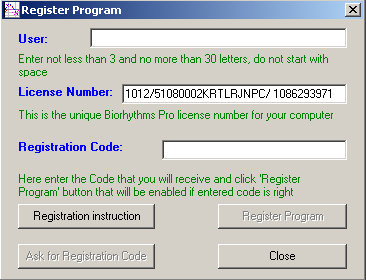
order to register program, click Help, Register Program, and
the following screen will appear:
Enter
User name (not less than 3 and no more than 30 characters; do
not start with space). "Ask for Registration Code"
button will become enabled after you enter first three
letters.
Then
click "Ask for Registration Code" button and email
will be sent to the distributor of this program. Shortly you
will receive information how payment can be done.
After
payment you will receive Registration Code, which you have to
enter into "Registration Code" field (with Copy/Paste),
press Register Program button and all features of the
Biorhythms Pro program will be enabled.
However,
if you decide to install the program to a different computer,
you will need another registration code.
Button
of the Program "Registration instruction" will
allow you to go directly to Internet sites of the
distributors of the Biorhythms Pro program .
Also
you can go to these sites from the "Links" page. Program
license allows user to obtain up to 3 registration codes and
to install Biorhythms Pro in up to three machines at one time.
If a legal user of the Biorhythms Pro program obtains a new
computer or needs to re-install the program, he will be
provided with an additional registration code for free.
Price
of the Biorhythms Pro program is 59 USD (45 Euro), it may vary
slightly from country to country.
 Here
is Program User's Guide
Here
is Program User's Guide
in
pdf /Acrobat Reader/ format, requires Acrobat
Reader to be installed in your PC))
|

 If you are looking for top Biorhythms software, you just found
it!
If you are looking for top Biorhythms software, you just found
it!


 | Home
|
| Home
|
 Introduction
 Download
Program
Download
Program About
Biorhythms
About
Biorhythms User's
Guide
User's
Guide Go
to Secure Order Form
Go
to Secure Order Form